Product
Double Stamps: Fill Your Quiet Hours on Purpose
Schedule 2× or 3× stamps for slow periods. reloop counts them automatically at the scanner or via NFC and promotes the offer in Apple & Google Wallet.
With scheduled 2× or 3× stamp offers you draw more guests into your quieter time slots – without cutting your prices and without extra work for your team. reloop automatically counts the stamps several times over at the scanner or via NFC and announces the offer right in Apple Wallet or Google Wallet.
Every business knows the times when things are slow: the Tuesday afternoon at the café, the hour after the lunch rush, or a quiet block of appointments at the studio. A blanket discount often applies even when it isn't needed at all. A time-limited stamp offer, by contrast, puts the incentive exactly where you want it.
With reloop you set once when your offer should apply. During that time window, a single stamp automatically becomes a 2× or 3× stamp. After that, your loyalty program continues as usual.
What are double stamps?
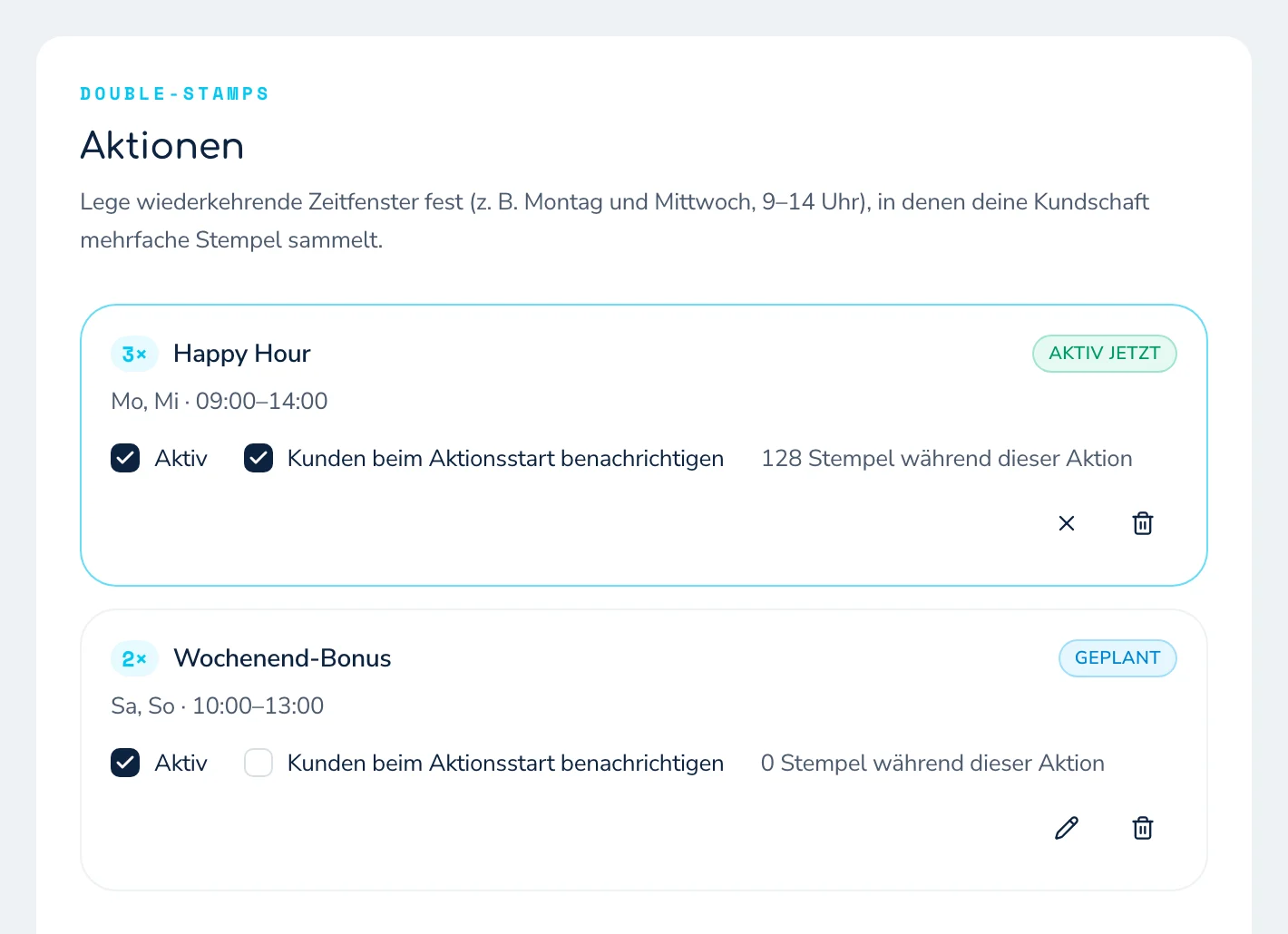
Double stamps – also called Double Stamps in the dashboard – are time-scheduled bonus offers within your digital stamp card. During a period you define, every regular stamp automatically counts double or triple.
You decide:
- which days of the week the offer runs;
- what time it starts and ends;
- whether 2× or 3× stamps are awarded;
- whether it recurs permanently or applies only within a date range;
- what text is shown on the wallet card.
| Setting | Behavior |
|---|---|
| Multiplier | 2× or 3× stamps |
| Schedule | selected days of the week and times |
| Validity | optional with a start and end date |
| Awarding | automatic via staff scanner or NFC |
| Wallet communication | notice via Google Wallet or Apple Wallet, depending on the platform |
| Count | up to four offers per program |
Why double stamps often fit better than a price discount
A discount lowers the price right away. Double stamps instead increase progress toward the next reward. The guest gets a clear extra incentive while your regular selling price stays intact.
A simple example: with a ten-stamp card, a guest earns one stamp on a normal visit. During a 2× offer they earn two, bringing them one extra visit closer to the reward. That feels immediately valuable, without you having to sell every product more cheaply during that time window.
Double stamps are therefore especially well suited when you want to:
- deliberately liven up weaker times of day;
- create a reason for a repeat visit;
- plan a grand opening or a promotional month;
- reward regulars without introducing a permanent discount.
Important: A stamp offer is a targeted time window, not a permanent state. Start with a clearly limited period and then check how your customers respond.
How to set up a 2× or 3× stamp offer
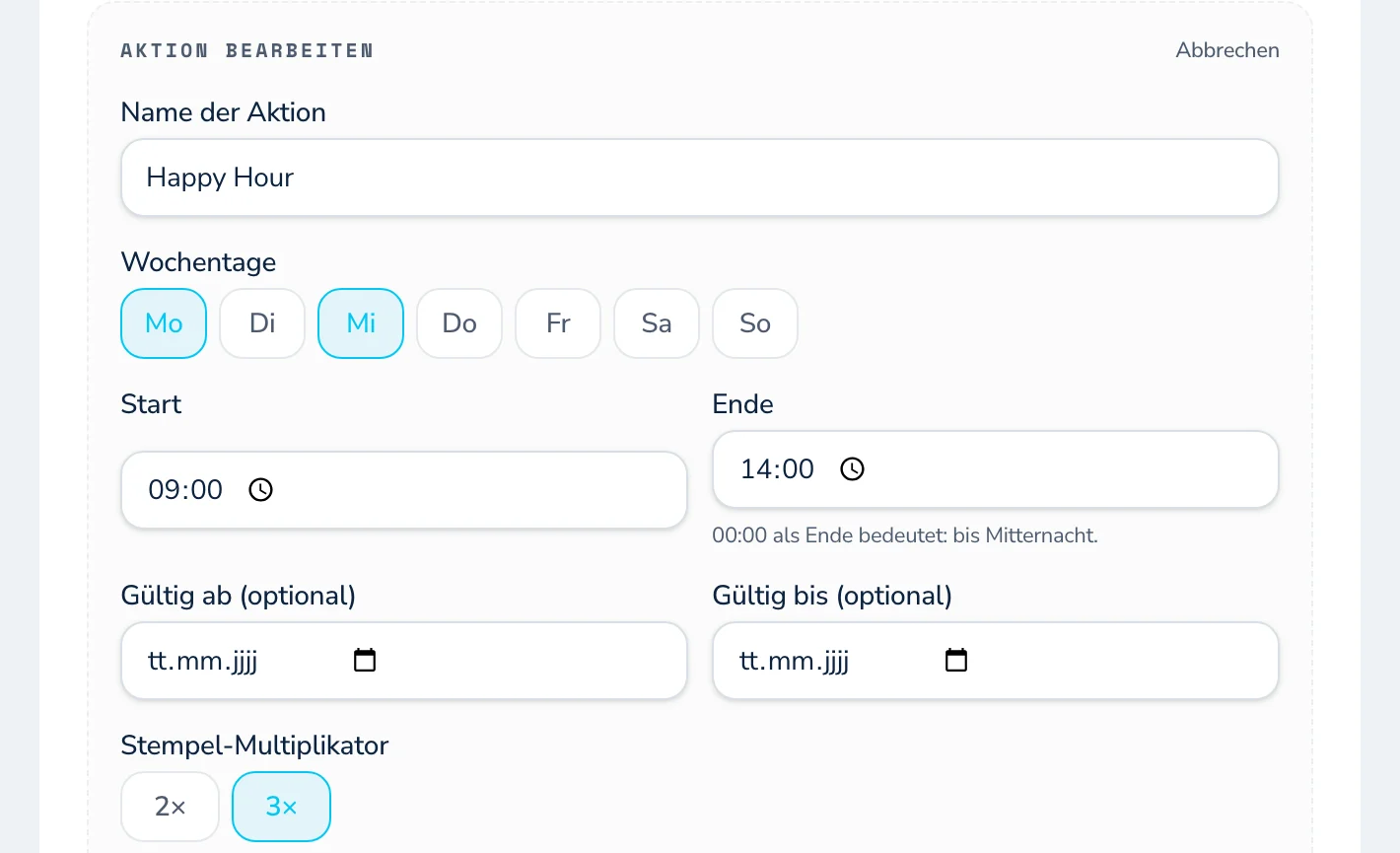
You set it up directly in your program under Offers:
- Give it a clear name, for example "Happy Hour" or "Tuesday Bonus".
- Choose the days of the week you want, plus the start and end time.
- Decide whether 2× or 3× stamps count during this window.
- If needed, limit the offer with a start and end date.
- Write the text for the wallet display and save the offer.
reloop activates and ends the time window automatically. Your team scans the customer card as usual or lets the guest tap the NFC tag. There's no other function to select during the offer.
An end time of 00:00 means "until midnight". If an offer should run past midnight, set up two time windows for it.
Announce the offer right in the wallet
So that your customers hear about the offer, you can add your own text for the wallet display. The placeholders {n} and {bis} are automatically replaced with the multiplier and the end time.
This:
Heute {n}× Stempel bis {bis} Uhr!
becomes, for example:
Heute 3× Stempel bis 14 Uhr!
The preview in the dashboard shows you, before you save, how the title and text will look on each type of device. If you don't enter your own wording, reloop uses a neutral default text.
Text templates for your stamp offer
Café or bakery
- Title:
{n}× Stempel am Nachmittag - Text:
Heute bis {bis} Uhr zählt jeder Einkauf {n}-fach. Komm vorbei!
Restaurant or takeaway
- Title:
Heute {n}× schneller zur Belohnung - Text:
Nur bis {bis} Uhr: Sichere dir bei deinem Besuch {n}× Stempel.
Hair, beauty, or services
- Title:
{n}× Stempel im Aktionszeitraum - Text:
Heute bis {bis} Uhr sammelst du bei deinem Termin {n}× Stempel.
Keep the texts short, concrete, and unambiguous about timing. The key benefit and the end time should be clear at a glance.
What do customers see on Apple and Google?
Apple Wallet and Google Wallet present time-based notices differently. The stamps are handled the same way on both platforms; only the way the offer is announced differs.
| Platform | How the offer is shown |
|---|---|
| Google Wallet | During the time window, a time-triggered notice can appear on the card. Optionally, a notification can be sent when it starts. |
| Apple Wallet | Near a stored location, a short message can appear on the lock screen during the offer. |
For the location-based notice on the iPhone, your business locations must be stored in the program settings. Without a location the multiple crediting still works; only the lock-screen notice is skipped.
Changes to the wallet display can take a few minutes. The multiple crediting at the scan or NFC tap, on the other hand, applies immediately as soon as the offer window is active.
Note for Google Wallet: Each card allows at most three notifications within any 24 hours. So use notifications deliberately and don't turn them on for every short time window.
Where does the stamp multiplier apply?
The multiplier kicks in on the two ways your business actively awards stamps:
- Staff scanner: Your team scans the QR code on the customer card as usual.
- NFC tap: The guest holds their smartphone to the NFC tag set up for it.
Receipt scanning and points-only programs are not affected. This keeps the offer limited to the controlled ways of awarding stamps.
If your program uses a daily limit, reloop adjusts it to the multiplier during the offer. A maximum of one stamp per day becomes a maximum of two stamps during a 2× offer. This keeps the bonus from getting stuck at the existing daily limit.
Four ideas for successful stamp offers
1. Quiet afternoons at the café or bakery
Schedule a 2× offer, for example, Tuesday through Thursday between 2 and 4 pm. The offer is clearly limited and speaks to exactly the weaker time window.
2. A bonus for slower weekdays
If fewer appointments are booked on Mondays or Tuesdays, a recurring bonus can create an extra reason to visit.
3. Grand opening or soft launch
Award 3× stamps during your opening month. With a stored end date, the offer expires automatically, so you don't have to remember it later.
4. A single promotional day
Use a special occasion, a local event, or a rainy day for a time-limited offer. For spontaneous offers, make sure there's still enough time to reach your customers via the wallet or your other channels.
How to get more out of the offer
- Choose a specific, genuinely quiet time window instead of an all-day offer.
- Start with 2× stamps and use 3× only for special occasions.
- Frame the benefit from the guest's point of view: "Collect double today" is clearer than an internal campaign name.
- Always state the end time so the offer stays understandable and credible.
- Brief your team in advance, even though the awarding happens automatically.
- After a few offer periods, compare visits in the chosen time window with comparable days without an offer.
Frequently asked questions about double stamps
Does my team have to change anything during the offer?
No. As soon as the scheduled time window is active, reloop automatically counts the stamps several times over at the staff scan or NFC tap. The usual workflow stays the same.
Can I also award triple stamps?
Yes. For each offer you can choose a multiplier of 2× or 3×.
Can a stamp offer run automatically every week?
Yes. You choose the days of the week and times you want. Optionally, you can also set a start and end date.
Do double stamps work with NFC?
Yes. During the active time window, the number of stamps set for the NFC tap is automatically multiplied by the offer factor.
Do customers need an app for this?
No. The digital stamp card sits in Apple Wallet or Google Wallet without an extra app. No additional customer app is required.
What happens if no location is stored for Apple Wallet?
The multiple crediting still works. Without a stored location, only the location-based offer notice on the iPhone lock screen is missing.
Are the bonus offers an add-on module?
No. The offers are part of the program and are set up directly in the reloop dashboard.
Liven up quiet times on purpose – without changing your workflow
With 2× and 3× stamp offers you add an extra incentive exactly when your business needs it. You schedule the time window once in the dashboard, reloop handles the multiple crediting, and your team keeps working as usual.
Your customers collect faster toward the next reward – right in the digital stamp card in Apple Wallet or Google Wallet, and without an extra app.